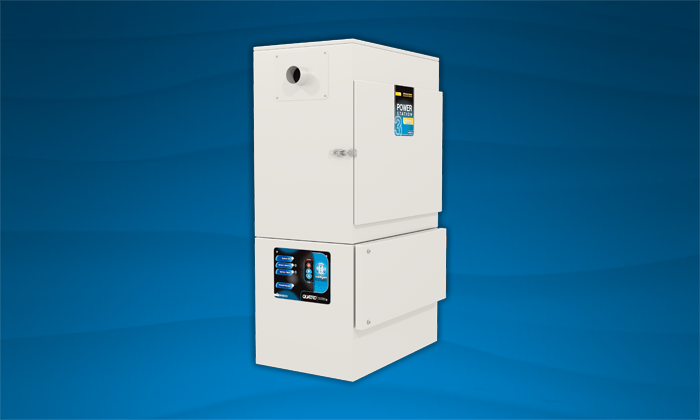
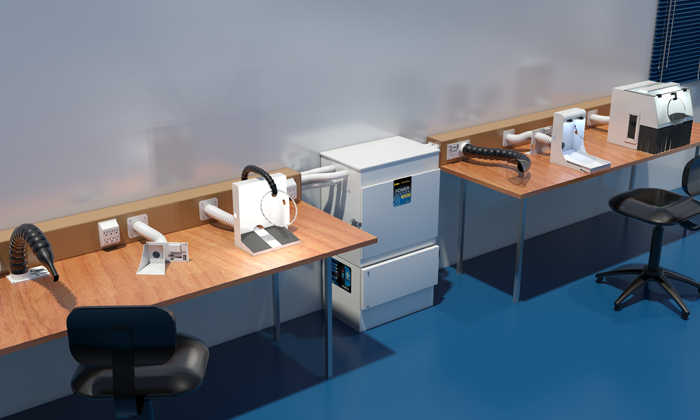
PowerStation 3.C INFINITY

Recommended Use

Part Number: PS316-5330G-0

PowerStation 3.C INFINITY

Medium-Duty – 3 – 4 hours a day

Medium-heavy Duty Milling.3-4 hours a day.2,000 hour dual infinity motors – includes mill-specific interface cable and HEPA filter.

Suggested Accessories
  • High capacity, SEALABLE, easily disposable filter bags
  • Filter bags offer safe capture and containment for large amounts of debris
  • HEPA Filter, 99.97% efficiency on sub-micron particles like fine zirconia dust in CAD/CAM milling
  • Double Hybrid INFINITY motors for extra power and prolonged motor life
  • Easy filter access from front
  • Bag-Full Pressure Indicator
  • AUTOFLOW: Set to lowest acceptable speed, motors will maintain airflow despite pressure increase
  • Temporary ON: Clean your mill while unit is in standby mode
  • Low-profile fits under the counter
  • Interchangeable inlets (rear/top)
  • Also included: Mill specific Auto Start-Stop cable & 6 ft suction hose
  • Optional: Silencer for noise suppression (#AA449), Foot-pedal/Hand-switch for 6 ft manual Start-Stop (#AA175/#AA375), Signal Splitter (#AA686) to operate unit with Auto-Signal AND Foot-Pedal (for quick and easy mill cleaning), Locking casters for optimal mobility (#AA037)
Specification Value
Dimensions (H x W x L): 38.5 x 25 x 14 in (98 x 64 x 36 cm)
Shipping Weight: 140 lb (64 kg)
Power: 100-120 V, 50/60 Hz, 12 A
Sound Level: 52 dB(A)
Filters: AG259-06 (6/box, larger quantities available
at price discounts), F357
Motor(s): Infinity AR175 (1/box, 2 boxes required)

Learn how to get the most out of your Quatro Air unit and troubleshoot common problems. You can also download the owner’s manual for this unit for technical details and instructions.

Owner’s Manual

Quatro Air PowerStation 3 Dust Collector Owner’s Manual

How to Set Up Your Unit for the First Time

Introduction

Congratulations! You are now owner of a Quatro JetStream Widebody dust collector; an efficient unit engineered to capture and contain airborne particulate generated by your application. As soon as the unit starts to operate, you will notice an improvement in air quality.


Safety Precaution

Keep all fastening hardware tight to ensure that the unit is in safe working condition. Familiarize yourself with the way in which filters are installed & replaced. All filters must be in place whenever this machine is in operation. Use only on a grounded electrical circuit; do not use any two-wire electrical prong adapters to defeat proper grounding. If servicing the unit, be careful not to touch the motor as soon as it has been turned off. It is hot and can cause injury. Do not substitute any of the unit’s filters with aftermarket products, as it will alter the design characteristics and possibly void the warranty.

IMPORTANT: Ensure power supply is unplugged during maintenance or filter service


Pre Start-Up Checklist

  1. Upon arrival, inspect unit for either visible or concealed damage. Damage should be immediately reported to the transport company
  2. Remove the filters from their plastic wrapping and install them in the correct order (if multiple filters) as described in the owner’s manual

Start-Up

WARNING: Do not operate unit until you’ve confirmed all filters have been installed

  1. Connect 1 1/2″ diameter hose to inlet on top of unit
  2. Connect other end of your hose to your accessory (debris source)
  3. Connect the power cord to both Dust Collector / Purifier Control Panel and 115-volt wall outlet
  4. Start unit by pressing the red power button (digital control panels) or by switching the toggle power switch to On position
When to Replace Your Filters

When you notice a significant drop in suction, or, if the unit is equipped with a digital control panel, when the Service filter light turns on, it is time to service the filters. Do not try to clean and reuse the filters as this will result in tear. If you need replacements, order new filters.

Unit Will Not Start

Suggested Solutions:

  • Make sure the power cord is properly connected into the unit and the wall outlet
  • Check the breaker box
  • Check the fuse on the unit and replace if blown
Unit Has Insufficient Airflow

Suggested Solutions:

  • Check the system for obstructions and if exist, remove them
  • Replace the filters if they are clogged or full
Unit Has Excessive Airflow

Suggested Solutions:

  • Check the system for obstructions and if exist, remove them
  • Replace the filters if they are clogged or full

Yellow Bag Filter

Part Number: AG259-06

Quantity: Six (6) Replacement yellow bag filter for your Quatro Air unit.

6″ HEPA Filter

Part Number: F357

6″ replacement HEPA filter for your Quatro Air unit.

Infinity Motor 120V

Part Number: AR175

Replacement Motor 120V

Related Products
Customers Also Bought